Changing username from Administrator to administrator: Difference between revisions
From NEOSYS Technical Support Wiki
Jump to navigationJump to search
Created page with '== Changing username from Administrator to administrator == '''WARNING!!!''' - The server will be locked FOREVER if you mistype the new administrator name! '''Procedure -''' #…' |
(No difference)
|
Revision as of 12:35, 11 April 2012
Changing username from Administrator to administrator
WARNING!!! - The server will be locked FOREVER if you mistype the new administrator name!
Procedure -
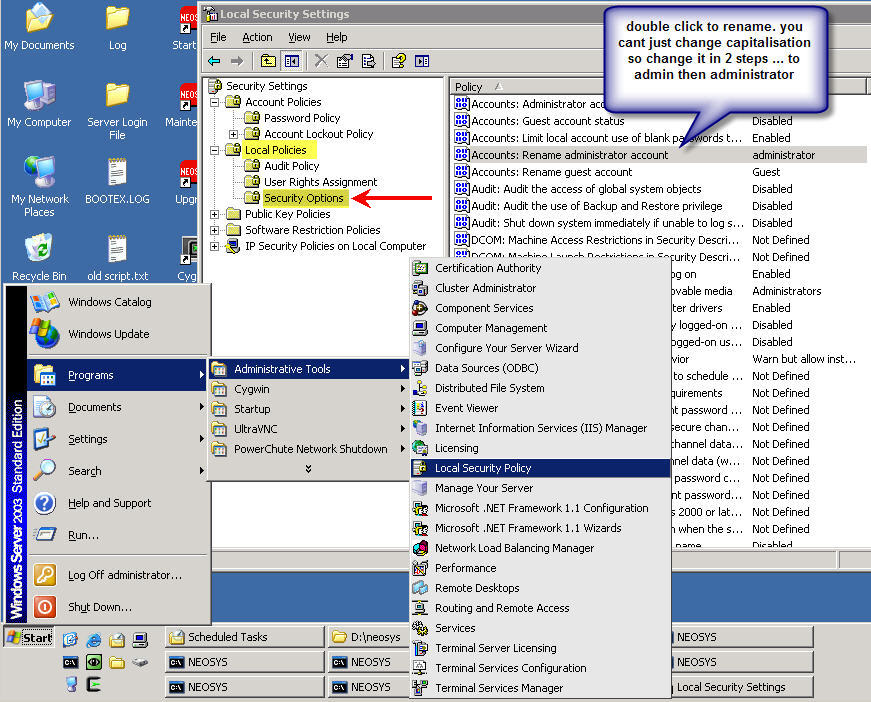
- Click on Start -> Programs -> Administrative Tools -> Local Security Policy
- Click on Local Policies -> Security Options
- Rename as mentioned in screenshot below:
- Check your typing very carefully! Take your time to read it aloud slowly letter by letter to avoid lazy brain syndrome for example. “a d m i n I s t r a t o r” and count 13 characters.
- After renaming, DON’T disconnect and reconnect to test. Check you can login with the changed username on a SECOND connection BEFORE you lose the working connection. If you cannot connect on the second connection then MAKE SURE you solve the problem using the first connection before closing it!

